 Sleevr
Try Sleevr
Sleevr is being tested on Android. Joining takes a few minutes. Do every step with the same Google account your phone’s Play Store uses (in the Play Store, tap your picture at the top right to see which one). Testing is open in the United States and Australia.
Join the testers group
First, show you’re a person: tick the box below.
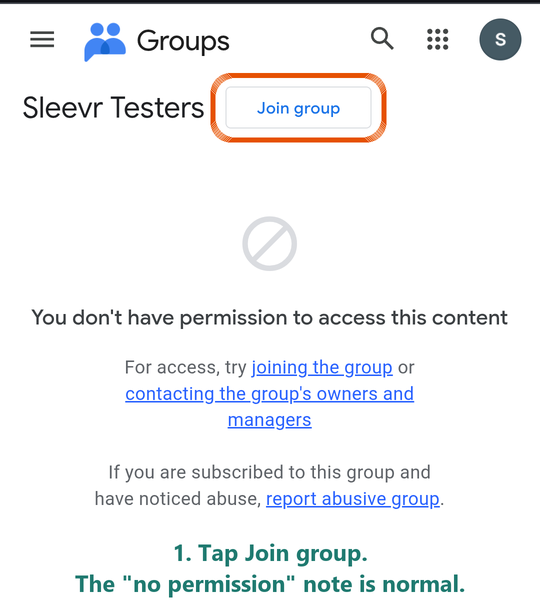
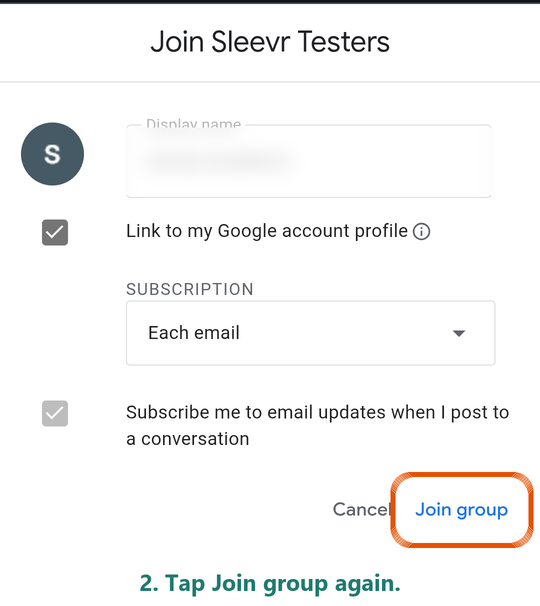
These extra taps are Google’s, not yours, and they’re easy to miss. They go away once Sleevr is out of testing.
Become a tester
Tap Become a tester, and it says You are a tester.
If it says the app or the page isn’t available, Google hasn’t finished adding you yet: wait five minutes and tap it again. It also says that if you’re signed in with a different Google account than in step 1.
Become a tester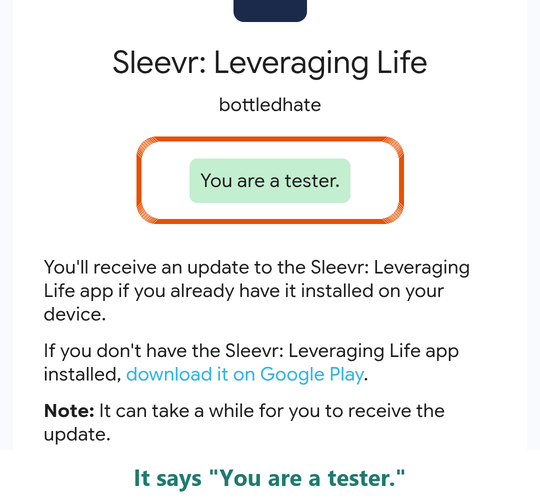
Install Sleevr
On your phone, tap Open in Google Play, then Install. Updates arrive automatically.
Open in Google PlayGoogle Play says the app isn’t available?
- Check the account. In the Play Store, tap your picture at the top right. It must be the account you joined the group with in step 1. If it isn’t, switch to it, or do steps 1 and 2 again with this one.
- Give it a few minutes. Right after step 2 Google Play can take a little while to show you the app. Wait five to ten minutes, close the Play Store app, then tap Open in Google Play again.
- Check step 2 went through. Open the tester page again: it should say You are a tester.
- Where you are. Testing is open in the United States and Australia for now. If you’re somewhere else, email us and we’ll add your country.
- Installed Sleevr from a file before? Uninstall that copy first: Google Play can’t install over an app that came from a download.
One favor. You’ll see features before anyone else. Please keep the ones that aren’t out yet to yourself (no screenshots or videos in public) until they’re released. Your ideas are welcome any time.
On a computer? Open getsleevr.com and sign in with Google.
When you connect Google Calendar, Gmail or Contacts, Google may say it hasn’t verified Sleevr yet. Tap Advanced, then Go to Sleevr to continue.